Wow, another card, can you dig it?

When I saw the word “twine” in the choices one could use for this challenge I new immediately I was going to attempt an idea that has been rattling around in the back of my brain for quite some time.

SUPPLIES:
Designer Paper - “Blank Canvas” by Kristin Cronin Barrow
Coloring Page Image - “Vase with Flowers” I traced this coloring page image from HERE using my Silhouette Designer Edition Software
Silhouette Sketch Pen - black
TomBow Markers - 025, 685, 443, 158, N00
Twine
Ribbon
Pearl Gems
Diamond Glaze

I used “twine” to wrap the vase!

*note: I used a TomBow marker to color one of the pearls because I did not have different coloured centers… it worked wonderful, allowing the shimmer of the pearl to shine through!

Today’s “1 small THING” is to share a technique I use to make some “line art” images with my Silhouette Designer Edition software.
Sometimes when I can’t find the stamp I want in my messy, jumbled craft drawers I would like to find a different image, clean and simple, to work with. I ♥ my Silhouette Sketch Pens and they can do some beautiful line work as well. So, I will just use Google and search for “Coloring Page” with “” (the item I’m looking for - in this instance a vase with flowers) Once you find the image of your dreams you can often simply right click and “copy” and then “paste” directly into your Silhouette program. And you end up with it like this:

Then you just trace it using the Trace tool in the program:

Once you have that selected you “trace” (click, pull and drag the mouse) around the flower and vase. You will wind up with an image like this:

The software got MOST of the trace but not all. Generally, in a nice black and white line art image like this one, you just need to click, or un-click, a box (and sometimes adjust a slider or two) to get a nice crisp trace:

In this instance I clicked the High Pass Filter Box off and I bumped the slider under Threshold up a bit - now my image looks solid, like this:

I want both the inside petals etc and the outside of the line art so I will choose the follwing trace setting (in the panel on the right of the screen)

Your trace will now make your image appear like this:

I don’t want to print this image at all so I just click and grab the trace lines and move them off of the image and delete the original image.

now I am ready to sketch and cut.
Now I am going to be the first to tell you I probably go about the next step different than most folk. Most folk would use the “cut line” settings but in a case like this (because the outside line is purely for cutting, while the inside lines are for the sketch pen, but here’s what I would do next:
Once you have deleted the original image, click on the traced image. Size it to how big or small you want it and then move it to a corner of the matt where you will sketch and cut it. Now, click on the image and then

You really may have to hit that “Release” command twice while to make it take effect. You will know its worked if the pieces of the image are now in separate bits - try moving one - then hit undo to get it back to normal if you move a petal or something by mistake. if you moved the outside line you are good to go for the next step.
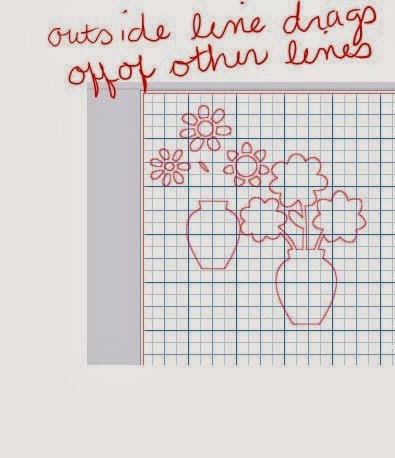
If you now have the outside line moved off the other bits, you can now simply select the outside line and hit DELETE to remove the outside line. We want to just sketch the inside lines. Load up your Cameo with cardstock and a Silhouette Sketch Pen and using the appropriate Sketch Pen setting then allow your Cammy to “draw” the image.
Once you have done this, then change the Setting on your machine to “Cardstock” setting for the cutting blade, adjust that if it needs to be twisted to “3” and then hit the UNDO button in your software until the sketch is whole again, with all the lines visible.
Now, click onto all the inside bits, leaving just the outside line. Now ask your Cameo to actually cut out, and it should cut this all out nicely. You will wind up with the sketched image nicely inside the cut out edge. Voila!
If I want to save the image as a .studio Silhouette file, I will then do “undo” until all the bits are back and then save the image for future projects.
I hope my instructions might be of use to you. Don’t be afraid to leave a comment/ask a question.


